2026-05-08
Codexのpetスキルでキャラがうまくジャンプできない問題を解決する ... users
Codexには、画面の端で小さなキャラが動くpetという機能があります。 弊社のSlackで活躍しているbotのキャラもpetにしてみました。名前はdokochan。 おばあちゃんを探している孫、という設定のキャラです。
それはいいのですが、実際に動かしてみると挙動が少しおかしい。 ジャンプ中に顔が大きく見えたり、動きによってキャラの大きさが揺れて見えたりします。 画像を確認してみると、生成された絵そのものよりも、あとから1コマずつ切り出して並べる処理に問題がありそうだとわかってきました。 今回は、Codexと相談しながらdokochanの動きを直した話です。
Before: dokochanのジャンプを個別に拡大
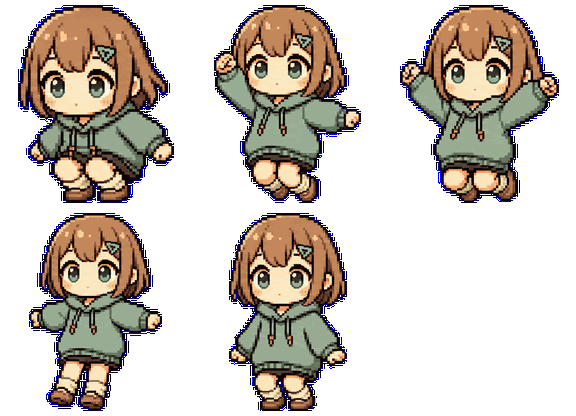
低い姿勢がセルに合わせて拡大され、ジャンプの上下移動よりもサイズ差が目立っていました。
After: dokochanも大きさを揃えて足元基準に
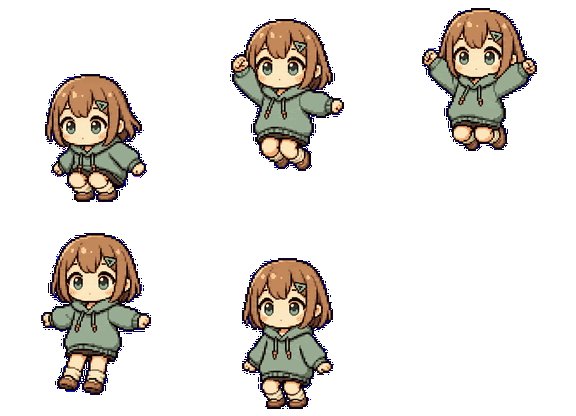
キャラの大きさを保ったまま、ジャンプをセル内の上下位置の変化として見せます。
まず、今の作り方を整理する
Codexのpet画像は、まず「待機」「走る」「ジャンプ」などの動きごとに、複数のポーズを横一列に並べた画像を作ります。
そこから1ポーズずつ切り出し、最後にアプリが読みやすい1枚の画像へ並べ直します。
この記事では、この横長の元画像を必要なところだけ row strip、並べ直した完成画像を atlas と呼びます。
0行目: 待機 / 6枚

1行目: 右へ移動 / 8枚

2行目: 左へ移動 / 8枚

3行目: 手を振る / 4枚

4行目: ジャンプ / 5枚

5行目: 失敗 / 8枚

6行目: 待つ / 6枚

7行目: 走る / 6枚

8行目: 確認中 / 6枚

横長画像から1ポーズずつ取り出す
既存の方法では、生成AIに「複数のポーズを横一列に並べた画像」を作らせます。
その後、extract_strip_frames.py が背景を透明にし、キャラが描かれている部分をポーズごとに見つけて、
Codex pet用の 192x208 の枠へ置いていきます。今回の違和感は、この「見つけて、切り出して、置く」処理の途中で生まれていました。



まず、マゼンタの背景を透明にします。 生成画像では背景色に少し揺れが出ることがあるので、完全一致ではなく近い色もまとめて消します。
背景を消したあと、残ったピクセルのつながりを見て、キャラが描かれている範囲を探します。 大きな塊をポーズ候補として、左から順番に並べます。
手足やハンドルのような小さな部品が別の塊として見つかることがあります。 その場合は、横位置が近いポーズへまとめて、1つの絵として扱います。
extract_strip_frames.py の全文を開く
#!/usr/bin/env python3
"""Extract generated horizontal row strips into 192x208 sprite frames."""

from __future__ import annotations

import argparse
import json
import math
import re
from pathlib import Path

from PIL import Image

CELL_WIDTH = 192
CELL_HEIGHT = 208
CELL_PADDING = 10
ROW_FRAME_COUNTS = {
    "idle": 6,
    "running-right": 8,
    "running-left": 8,
    "waving": 4,
    "jumping": 5,
    "failed": 8,
    "waiting": 6,
    "running": 6,
    "review": 6,
}
REFERENCE_HEIGHT_STATES = {"idle", "waving", "waiting", "review"}
IDENTITY_HEIGHT_STATES = {"running-right", "running-left", "running"}
MAX_IDENTITY_ROW_SCALE = 1.45


def parse_states(raw: str) -> list[str]:
    if raw.strip().lower() == "all":
        return list(ROW_FRAME_COUNTS)
    states = [item.strip() for item in raw.split(",") if item.strip()]
    unknown = sorted(set(states) - set(ROW_FRAME_COUNTS))
    if unknown:
        raise SystemExit(f"unknown state(s): {', '.join(unknown)}")
    return states


def parse_hex_color(value: str) -> tuple[int, int, int]:
    if not re.fullmatch(r"#[0-9a-fA-F]{6}", value):
        raise SystemExit(f"invalid chroma key color: {value}; expected #RRGGBB")
    return tuple(int(value[index : index + 2], 16) for index in (1, 3, 5))


def load_chroma_key(decoded_dir: Path, override: str | None) -> tuple[int, int, int]:
    if override:
        return parse_hex_color(override)
    request_path = decoded_dir.parent / "pet_request.json"
    if request_path.is_file():
        request = json.loads(request_path.read_text(encoding="utf-8"))
        chroma_key = request.get("chroma_key")
        if isinstance(chroma_key, dict) and isinstance(chroma_key.get("hex"), str):
            return parse_hex_color(chroma_key["hex"])
    return parse_hex_color("#00FF00")


def color_distance(
    red: int,
    green: int,
    blue: int,
    key: tuple[int, int, int],
) -> float:
    return math.sqrt((red - key[0]) ** 2 + (green - key[1]) ** 2 + (blue - key[2]) ** 2)


def remove_chroma_background(
    image: Image.Image,
    chroma_key: tuple[int, int, int],
    threshold: float,
) -> Image.Image:
    rgba = image.convert("RGBA")
    pixels = rgba.load()
    for y in range(rgba.height):
        for x in range(rgba.width):
            red, green, blue, alpha = pixels[x, y]
            if color_distance(red, green, blue, chroma_key) <= threshold:
                pixels[x, y] = (red, green, blue, 0)
    return rgba


def fit_to_cell(image: Image.Image) -> Image.Image:
    bbox = image.getbbox()
    target = Image.new("RGBA", (CELL_WIDTH, CELL_HEIGHT), (0, 0, 0, 0))
    if bbox is None:
        return target

    sprite = image.crop(bbox)
    max_width = CELL_WIDTH - CELL_PADDING
    max_height = CELL_HEIGHT - CELL_PADDING
    scale = min(max_width / sprite.width, max_height / sprite.height, 1.0)
    if scale != 1.0:
        sprite = sprite.resize(
            (max(1, round(sprite.width * scale)), max(1, round(sprite.height * scale))),
            Image.Resampling.LANCZOS,
        )
    left = (CELL_WIDTH - sprite.width) // 2
    top = (CELL_HEIGHT - sprite.height) // 2
    target.alpha_composite(sprite, (left, top))
    return target


def fit_sprites_to_cells_consistently(
    sprites: list[tuple[Image.Image, tuple[int, int, int, int]]],
    scale: float | None = None,
) -> list[Image.Image]:
    if not sprites:
        return []

    max_width = CELL_WIDTH - CELL_PADDING
    max_height = CELL_HEIGHT - CELL_PADDING
    max_sprite_width = max(sprite.width for sprite, _bbox in sprites)
    global_min_y = min(bbox[1] for _sprite, bbox in sprites)
    global_max_y = max(bbox[3] for _sprite, bbox in sprites)
    vertical_span = max(1, global_max_y - global_min_y)
    if scale is None:
        scale = min(
            max_width / max(1, max_sprite_width),
            max_height / vertical_span,
            1.0,
        )
    baseline_y = CELL_HEIGHT - max(4, CELL_PADDING // 2)
    frames: list[Image.Image] = []

    for sprite, bbox in sprites:
        target = Image.new("RGBA", (CELL_WIDTH, CELL_HEIGHT), (0, 0, 0, 0))
        scaled_width = max(1, round(sprite.width * scale))
        scaled_height = max(1, round(sprite.height * scale))
        scaled = sprite
        if scaled.size != (scaled_width, scaled_height):
            scaled = sprite.resize((scaled_width, scaled_height), Image.Resampling.LANCZOS)
        left = (CELL_WIDTH - scaled.width) // 2
        # Keep row-local vertical motion, but anchor it from the lowest foot point.
        top = baseline_y - round((global_max_y - bbox[1]) * scale)
        top = max(0, min(CELL_HEIGHT - scaled.height, top))
        target.alpha_composite(scaled, (left, top))
        frames.append(target)

    return frames


def connected_components(image: Image.Image) -> list[dict[str, object]]:
    alpha = image.getchannel("A")
    width, height = image.size
    data = alpha.tobytes()
    visited = bytearray(width * height)
    components: list[dict[str, object]] = []

    for start, alpha_value in enumerate(data):
        if alpha_value <= 16 or visited[start]:
            continue

        stack = [start]
        visited[start] = 1
        pixels: list[int] = []
        min_x = width
        min_y = height
        max_x = 0
        max_y = 0

        while stack:
            current = stack.pop()
            pixels.append(current)
            x = current % width
            y = current // width
            min_x = min(min_x, x)
            min_y = min(min_y, y)
            max_x = max(max_x, x)
            max_y = max(max_y, y)

            if x > 0:
                neighbor = current - 1
                if not visited[neighbor] and data[neighbor] > 16:
                    visited[neighbor] = 1
                    stack.append(neighbor)
            if x + 1 < width:
                neighbor = current + 1
                if not visited[neighbor] and data[neighbor] > 16:
                    visited[neighbor] = 1
                    stack.append(neighbor)
            if y > 0:
                neighbor = current - width
                if not visited[neighbor] and data[neighbor] > 16:
                    visited[neighbor] = 1
                    stack.append(neighbor)
            if y + 1 < height:
                neighbor = current + width
                if not visited[neighbor] and data[neighbor] > 16:
                    visited[neighbor] = 1
                    stack.append(neighbor)

        components.append(
            {
                "pixels": pixels,
                "area": len(pixels),
                "bbox": (min_x, min_y, max_x + 1, max_y + 1),
                "center_x": (min_x + max_x + 1) / 2,
            }
        )

    return components


def component_group_image(
    source: Image.Image,
    components: list[dict[str, object]],
    padding: int = 4,
) -> tuple[Image.Image, tuple[int, int, int, int]]:
    width, height = source.size
    min_x = max(0, min(component["bbox"][0] for component in components) - padding)
    min_y = max(0, min(component["bbox"][1] for component in components) - padding)
    max_x = min(width, max(component["bbox"][2] for component in components) + padding)
    max_y = min(height, max(component["bbox"][3] for component in components) + padding)

    output = Image.new("RGBA", (max_x - min_x, max_y - min_y), (0, 0, 0, 0))
    source_pixels = source.load()
    output_pixels = output.load()
    for component in components:
        for pixel_index in component["pixels"]:
            x = pixel_index % width
            y = pixel_index // width
            output_pixels[x - min_x, y - min_y] = source_pixels[x, y]
    return output, (min_x, min_y, max_x, max_y)


def extract_component_sprites(
    strip: Image.Image,
    frame_count: int,
) -> list[tuple[Image.Image, tuple[int, int, int, int]]] | None:
    components = connected_components(strip)
    if not components:
        return None

    largest_area = max(component["area"] for component in components)
    seed_threshold = max(120, largest_area * 0.20)
    seeds = [component for component in components if component["area"] >= seed_threshold]
    if len(seeds) < frame_count:
        seeds = sorted(components, key=lambda component: component["area"], reverse=True)[
            :frame_count
        ]
    if len(seeds) < frame_count:
        return None

    seeds = sorted(
        sorted(seeds, key=lambda component: component["area"], reverse=True)[:frame_count],
        key=lambda component: component["center_x"],
    )
    seed_ids = {id(seed) for seed in seeds}
    groups: list[list[dict[str, object]]] = [[seed] for seed in seeds]
    noise_threshold = max(12, largest_area * 0.002)

    for component in components:
        if id(component) in seed_ids or component["area"] < noise_threshold:
            continue
        nearest_index = min(
            range(len(seeds)),
            key=lambda index: abs(seeds[index]["center_x"] - component["center_x"]),
        )
        groups[nearest_index].append(component)

    return [component_group_image(strip, group) for group in groups]


def extract_component_frames(strip: Image.Image, frame_count: int) -> list[Image.Image] | None:
    sprites = extract_component_sprites(strip, frame_count)
    if sprites is None:
        return None
    return fit_sprites_to_cells_consistently(sprites)


def extract_slot_sprites(
    strip: Image.Image,
    frame_count: int,
) -> list[tuple[Image.Image, tuple[int, int, int, int]]]:
    slot_width = strip.width / frame_count
    sprites = []
    for index in range(frame_count):
        left = round(index * slot_width)
        right = round((index + 1) * slot_width)
        crop = strip.crop((left, 0, right, strip.height))
        bbox = crop.getbbox()
        if bbox is None:
            sprites.append((Image.new("RGBA", (1, 1), (0, 0, 0, 0)), (left, 0, left + 1, 1)))
            continue
        sprite = crop.crop(bbox)
        sprites.append((sprite, (left + bbox[0], bbox[1], left + bbox[2], bbox[3])))
    return sprites


def extract_slot_frames(strip: Image.Image, frame_count: int) -> list[Image.Image]:
    return fit_sprites_to_cells_consistently(extract_slot_sprites(strip, frame_count))


def extract_state_sprites(
    strip_path: Path,
    state: str,
    chroma_key: tuple[int, int, int],
    threshold: float,
    method: str,
) -> dict[str, object]:
    frame_count = ROW_FRAME_COUNTS[state]
    with Image.open(strip_path) as opened:
        strip = remove_chroma_background(opened, chroma_key, threshold)

    sprites = None
    used_method = method
    if method in {"auto", "components"}:
        sprites = extract_component_sprites(strip, frame_count)
        if sprites is None and method == "components":
            raise SystemExit(f"could not find {frame_count} sprite components in {strip_path}")
        if sprites is not None:
            used_method = "components"

    if sprites is None:
        sprites = extract_slot_sprites(strip, frame_count)
        used_method = "slots"

    return {"state": state, "sprites": sprites, "method": used_method}


def global_scale_for_states(states: list[dict[str, object]]) -> float:
    sprites = [
        sprite
        for state in states
        for sprite, _bbox in state["sprites"]
        if isinstance(sprite, Image.Image)
    ]
    if not sprites:
        return 1.0
    max_width = max(sprite.width for sprite in sprites)
    max_height = max(sprite.height for sprite in sprites)
    return min(
        (CELL_WIDTH - CELL_PADDING) / max(1, max_width),
        (CELL_HEIGHT - CELL_PADDING) / max(1, max_height),
        1.0,
    )


def median(values: list[float]) -> float:
    if not values:
        return 0.0
    ordered = sorted(values)
    middle = len(ordered) // 2
    if len(ordered) % 2:
        return ordered[middle]
    return (ordered[middle - 1] + ordered[middle]) / 2


def row_median_height(state: dict[str, object]) -> float:
    heights = [
        sprite.height
        for sprite, _bbox in state["sprites"]
        if isinstance(sprite, Image.Image)
    ]
    return median([float(height) for height in heights])


def identity_row_scales(states: list[dict[str, object]]) -> dict[str, float]:
    reference_heights = [
        row_median_height(state)
        for state in states
        if state["state"] in REFERENCE_HEIGHT_STATES
    ]
    canonical_height = median([height for height in reference_heights if height > 0])
    row_scales: dict[str, float] = {}
    for state in states:
        state_name = str(state["state"])
        row_height = row_median_height(state)
        if canonical_height <= 0 or row_height <= 0 or state_name not in IDENTITY_HEIGHT_STATES:
            row_scales[state_name] = 1.0
            continue
        row_scales[state_name] = min(MAX_IDENTITY_ROW_SCALE, canonical_height / row_height)
    return row_scales


def write_state_frames(
    state: str,
    sprites: list[tuple[Image.Image, tuple[int, int, int, int]]],
    output_root: Path,
    used_method: str,
    scale: float | None,
) -> dict[str, object]:
    state_dir = output_root / state
    state_dir.mkdir(parents=True, exist_ok=True)
    frames = fit_sprites_to_cells_consistently(sprites, scale=scale)
    outputs = []
    for index, frame in enumerate(frames):
        output = state_dir / f"{index:02d}.png"
        frame.save(output)
        outputs.append(str(output))
    return {"state": state, "frames": outputs, "method": used_method}


def extract_state(
    strip_path: Path,
    state: str,
    output_root: Path,
    chroma_key: tuple[int, int, int],
    threshold: float,
    method: str,
) -> dict[str, object]:
    frame_count = ROW_FRAME_COUNTS[state]
    with Image.open(strip_path) as opened:
        strip = remove_chroma_background(opened, chroma_key, threshold)

    state_dir = output_root / state
    state_dir.mkdir(parents=True, exist_ok=True)

    frames = None
    used_method = method
    if method in {"auto", "components"}:
        frames = extract_component_frames(strip, frame_count)
        if frames is None and method == "components":
            raise SystemExit(f"could not find {frame_count} sprite components in {strip_path}")
        if frames is not None:
            used_method = "components"

    if frames is None:
        frames = extract_slot_frames(strip, frame_count)
        used_method = "slots"

    outputs = []
    for index, frame in enumerate(frames):
        output = state_dir / f"{index:02d}.png"
        frame.save(output)
        outputs.append(str(output))
    return {"state": state, "frames": outputs, "method": used_method}


def main() -> None:
    parser = argparse.ArgumentParser(description=__doc__)
    parser.add_argument("--decoded-dir", required=True)
    parser.add_argument("--output-dir", required=True)
    parser.add_argument("--states", default="all")
    parser.add_argument("--chroma-key", help="Override chroma key as #RRGGBB.")
    parser.add_argument("--key-threshold", type=float, default=96.0)
    parser.add_argument(
        "--method",
        choices=("auto", "components", "slots"),
        default="auto",
        help="Use connected sprite components when possible, or fixed equal slots.",
    )
    parser.add_argument(
        "--normalization",
        choices=("global", "row"),
        default="global",
        help="Use one atlas-wide scale by default; row keeps the older per-row scale.",
    )
    args = parser.parse_args()

    decoded_dir = Path(args.decoded_dir).expanduser().resolve()
    output_dir = Path(args.output_dir).expanduser().resolve()
    chroma_key = load_chroma_key(decoded_dir, args.chroma_key)
    states = parse_states(args.states)
    manifest = []
    if args.normalization == "global":
        extracted_states = []
        for state in states:
            strip_path = decoded_dir / f"{state}.png"
            if not strip_path.is_file():
                raise SystemExit(f"missing generated strip for {state}: {strip_path}")
            extracted_states.append(
                extract_state_sprites(
                    strip_path,
                    state,
                    chroma_key,
                    args.key_threshold,
                    args.method,
                )
            )
        common_scale = global_scale_for_states(extracted_states)
        row_scales = identity_row_scales(extracted_states)
        scales = {
            extracted["state"]: common_scale * row_scales[str(extracted["state"])]
            for extracted in extracted_states
        }
        for extracted in extracted_states:
            manifest.append(
                write_state_frames(
                    extracted["state"],
                    extracted["sprites"],
                    output_dir,
                    extracted["method"],
                    scales[extracted["state"]],
                )
            )
    else:
        scales = None
        row_scales = None
        for state in states:
            strip_path = decoded_dir / f"{state}.png"
            if not strip_path.is_file():
                raise SystemExit(f"missing generated strip for {state}: {strip_path}")
            manifest.append(
                extract_state(
                    strip_path,
                    state,
                    output_dir,
                    chroma_key,
                    args.key_threshold,
                    args.method,
                )
            )

    (output_dir / "frames-manifest.json").write_text(
        json.dumps(
            {
                "ok": True,
                "chroma_key": {
                    "hex": f"#{chroma_key[0]:02X}{chroma_key[1]:02X}{chroma_key[2]:02X}",
                    "rgb": list(chroma_key),
                    "threshold": args.key_threshold,
                },
                "normalization": {
                    "mode": args.normalization,
                    "scale": scales,
                    "row_scale": row_scales,
                    "reference_height_states": sorted(REFERENCE_HEIGHT_STATES),
                    "identity_height_states": sorted(IDENTITY_HEIGHT_STATES),
                    "anchor": "row-local foot baseline with atlas-wide base scale and row-level identity height correction",
                },
                "rows": manifest,
            },
            indent=2,
        )
        + "\n",
        encoding="utf-8",
    )
    print(json.dumps({"ok": True, "frames_root": str(output_dir), "states": states}, indent=2))


if __name__ == "__main__":
    main()
そこで起きていた問題
以前の処理では、ポーズごとにキャラの範囲を見つけ、その範囲だけを見て枠いっぱいに収めていました。 そのため、しゃがむ・倒れる・ジャンプするような姿勢では、本来は上下位置として見えるべき変化が、 キャラ自体の拡大縮小に変わってしまっていました。
各ポーズの見た目の範囲だけを見て枠に収めるため、低い姿勢ほど大きく拡大されます。 その結果、同じ動きの中でキャラの大きさが揺れます。
先にすべてのポーズを取り出し、一番大きいキャラが枠に収まる倍率を決めます。 そのうえで、左右移動のように本来同じ背丈で見えるべき動きだけ、行全体に同じ補正をかけます。
足元を基準に配置し、余った空間は頭の上へ逃がします。 ジャンプや転倒の低さは、サイズ変更ではなく位置の変化として残します。
Before: ジャンプ中の各ポーズを個別に拡大
低い姿勢や小さく検出された姿勢をセルいっぱいに寄せるため、ジャンプの上下移動よりも 「キャラが伸び縮みしている」ように見えます。
After: 大きさを揃えて足元基準で配置
同じ動きから切り出したポーズは、同じ倍率のまま足元を基準に配置します。 余白は頭上に逃がし、ジャンプはサイズ差ではなく上下位置の変化として残します。
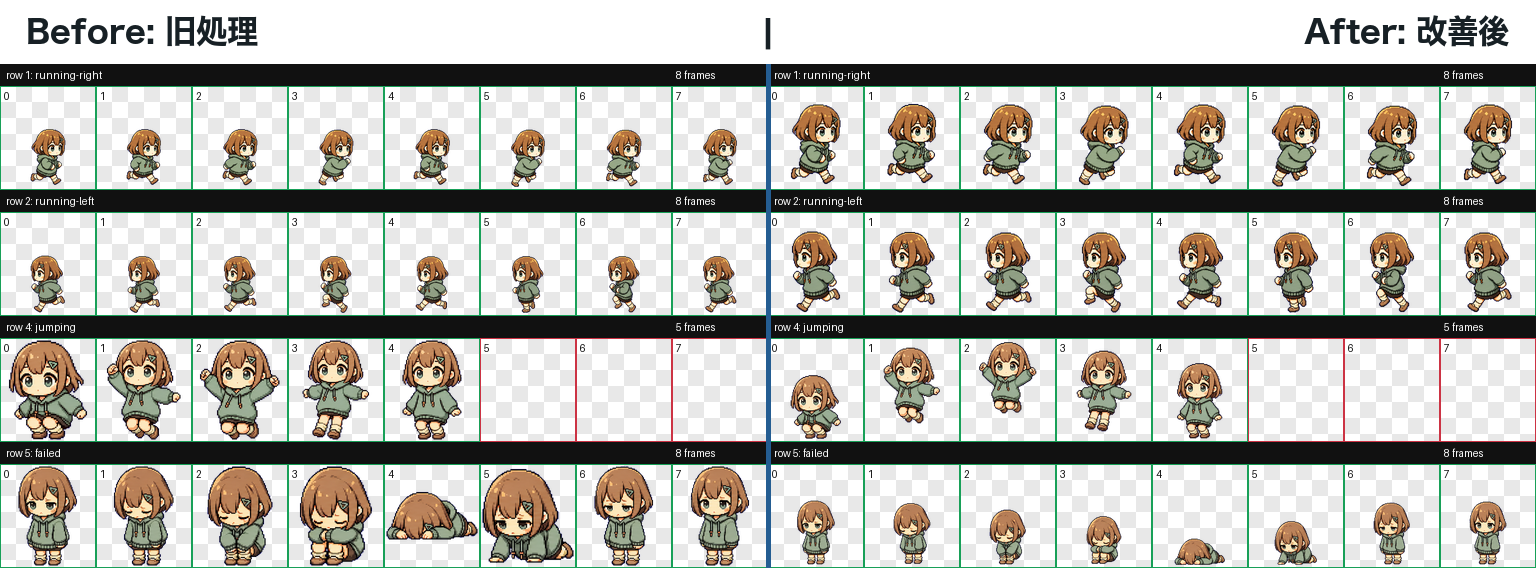
- 実装は
extract_strip_frames.py。全ポーズの最大サイズから共通の倍率を決める - 左右移動の行は、立ち姿に近い行の高さを参考にして、行全体を同じ倍率で補正
- ポーズごとの個別拡大をやめるので、同じ動きの中で大きさが揺れにくい
- 足元を基準に揃え、姿勢の高さ差は頭上の余白で吸収
- 最終検証の
final/validation.jsonは errors 0 / warnings 0
今回の改善では、画像生成そのものはやり直していません。 生成済みの横長画像からポーズを切り出す処理を直し、見た目の同一性を保ったまま、アニメーション中の大きさの揺れだけを減らしています。
左右移動だけ小さく見える問題を直す
左右に移動する絵だけ、静止時より小さく見える問題もありました。 原因は、走っている姿勢の検出範囲が立ち姿より低く、共通倍率にしただけでは、その低さがそのまま残ったことです。 新しい処理では、待機や手振りなどの自然な立ち姿から標準の高さを推定し、左右移動と走行だけを行単位で補正します。
背景を消したあと、各ポーズでキャラが描かれている範囲を取り出します。 ポーズ単位ではなく動き単位で中央値を取り、偶然の手足や小物に引っ張られにくくします。
待機、手振り、待ち、レビューの行を基準にして、自然なキャラの高さを推定します。 転倒やジャンプは高さが変わること自体が動きなので、この補正対象から外します。
左右移動と走行は、行全体に同じ倍率をかけます。 これにより、移動中のキャラサイズだけが縮む違和感を抑えます。

running-right の行を左before / 右afterで並べたものです。
beforeでは行全体が小さく、afterでは同じ行にだけ同じ倍率をかけて高さを補正しています。
- running-right 平均高さを約138pxから約188pxへ補正
- running-left 平均高さを約140pxから約188pxへ補正
frames-manifest.jsonにrow_scaleを記録qa/review.jsonとfinal/validation.jsonは errors 0 / warnings 0
作成した順番
作業用の設定を作る
~/.codex/pet-runs/dokochan に作業用フォルダを作り、
dokochanの見た目、動きごとの指示、配置ガイド、出力先を決めました。
基準になる画像を生成
Slack botとして使っているdokochanの見た目を基準にし、 以後の動き生成でも同じキャラに見えるようにしました。
同じキャラに見えるかを先に確認
まず、待機と右移動の画像を先に生成しました。 静止中と移動中で同じdokochanに見えることを確認してから、残りの動きに進みました。
左右移動も個別に確認する
左右移動は、向きが変わったときに髪型や服の印象が崩れやすいので、 右移動と左移動をそれぞれ確認し、同じキャラに見えるかを見ました。
残りの動きを並列で生成
手を振る、ジャンプ、失敗、待つ、走る、確認中の画像を、動きごとに生成しました。 親エージェントは、設定の記録と最後のパッケージ化だけを担当しました。
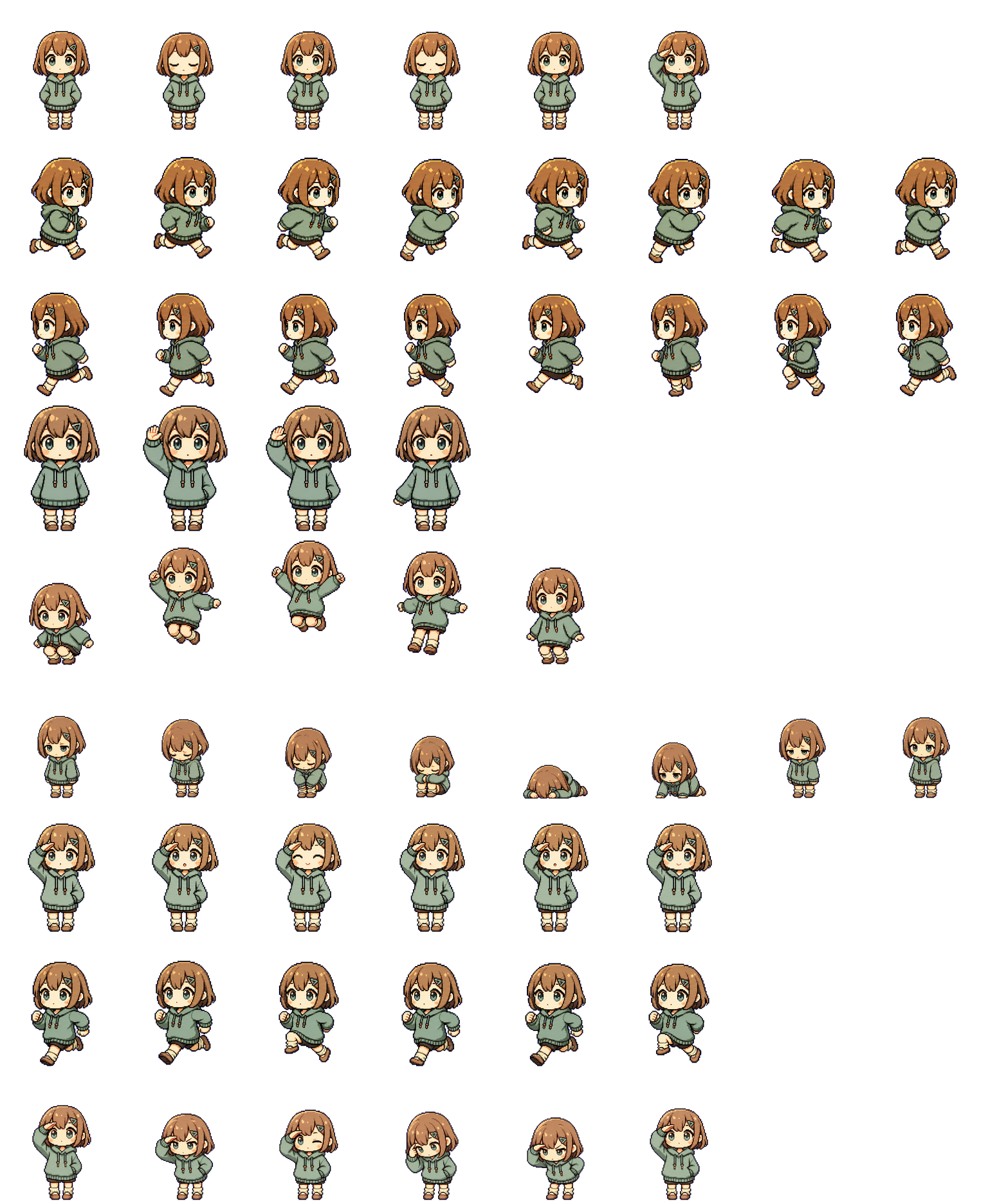
1枚の完成画像にまとめて確認
生成した横長画像から各ポーズを取り出し、透明背景の 192x208 の枠へ並べ直しました。
この「全ての動きを1枚に敷き詰めた画像」がatlasで、Codex Appは
pet.json の行定義を見ながら、該当する枠を順番に再生します。
採用した改善方針
今回の問題は、dokochanの絵を作り直すよりも、生成済みの横長画像をどう切り出して、どの単位で大きさを揃えるかを直す方が筋がよさそうでした。 ここでは、実際に採用した方針と、途中でやめた方針をまとめます。
すべての姿勢を1枚でまとめて作るのではなく、基準になる画像を先に作り、 待機、右移動、左移動、ジャンプなどを動きごとに生成します。 その後、決まった手順で1ポーズずつ切り出し、192x208の枠へ配置します。
右向きのはずが左を向いているなど、動きそのものが壊れている場合は再生成が必要です。 ただし、ジャンプや左右移動のサイズ違和感は生成をやり直すと泥沼化しやすいため、 まず切り抜き・正規化アルゴリズムで直します。
各ポーズを枠いっぱいに拡大すると、しゃがみ・ジャンプ・倒れ姿勢の高さ差が消えます。 その結果、動きが上下移動ではなく頭や体の拡大縮小に見えます。
すべての動きから全ポーズを先に取り出し、一番大きいキャラが枠に収まる倍率を基準にします。 ジャンプの上昇や転倒姿勢の低さは、足元からの位置変化として残します。
左右移動の行は、検出された高さが立ち姿より低いことがあり、共通倍率だけでは小さく見えます。 idle / waving / waiting / review から標準高さを推定し、走行系だけを行全体で同じ倍率に補正します。
ジャンプや転倒は高さが変わること自体が表現なので、大きさ補正の対象から外します。 左右移動と走行は同じ背丈に見えるべき動きなので、補正対象にします。
最終的にやっていること
背景を透明にし、各ポーズでキャラが描かれている部分を取り出します。 そのうえで全体に共通する大きさを決め、走行系だけ標準の高さに近づくよう行単位で補正し、 最後に足元の位置を揃えて、完成用の1枚画像へ並べます。
採用しなかった方針
- サイズ違和感のたびに画像生成をやり直す
- frameごとにセルへ最大fitする
- 全rowを同じ高さへ強制し、jumping / failed の意味まで消す
- pet-runsだけを正式アセットとして扱う
~/.codex/pet-runs/<pet> は作業履歴とQA置き場です。
Codex Appが読む正式アセットは ~/.codex/pets/<pet>/pet.json と
~/.codex/pets/<pet>/spritesheet.webp です。
まだ弱いところ
今回の方式は、画像生成をやり直さずに実用的な品質へ寄せるための、切り出し範囲と行ごとの統計を使った改善です。 ただし、キャラ本体を意味として理解しているわけではないため、まだ弱点があります。
自転車、ハンドル、手足、髪の跳ねなどを意味的に分離していないため、長い小物があるrowではbboxや幅の基準が引っ張られる可能性があります。
idle / waving / waiting / review から標準高さを推定しているため、これらのrow自体が崩れているpetでは補正基準も崩れます。
走行系は補正し、ジャンプや転倒は補正しない、というルールは今回のpetには合っていますが、別キャラや別モーションでは調整が必要になる場合があります。
次に入れるなら
APIなしでさらに強くするなら、キャラを完全に意味理解する方向ではなく、足元・頭頂・胴体中心を推定する軽いルールを足すのが現実的です。 そうすると、単純な外接矩形ではなく「キャラ本体らしさ」に近い基準で大きさを決められます。
残る不確実性
- 極端に小さいrowでは
MAX_IDENTITY_ROW_SCALEの上限に当たる - 横長の小物があるpetでは、横幅の制約で拡大しきれない
- 頭頂や足元を本当に認識しているわけではなく、透明でないピクセル範囲に基づく推定である
完成した画像と確認結果
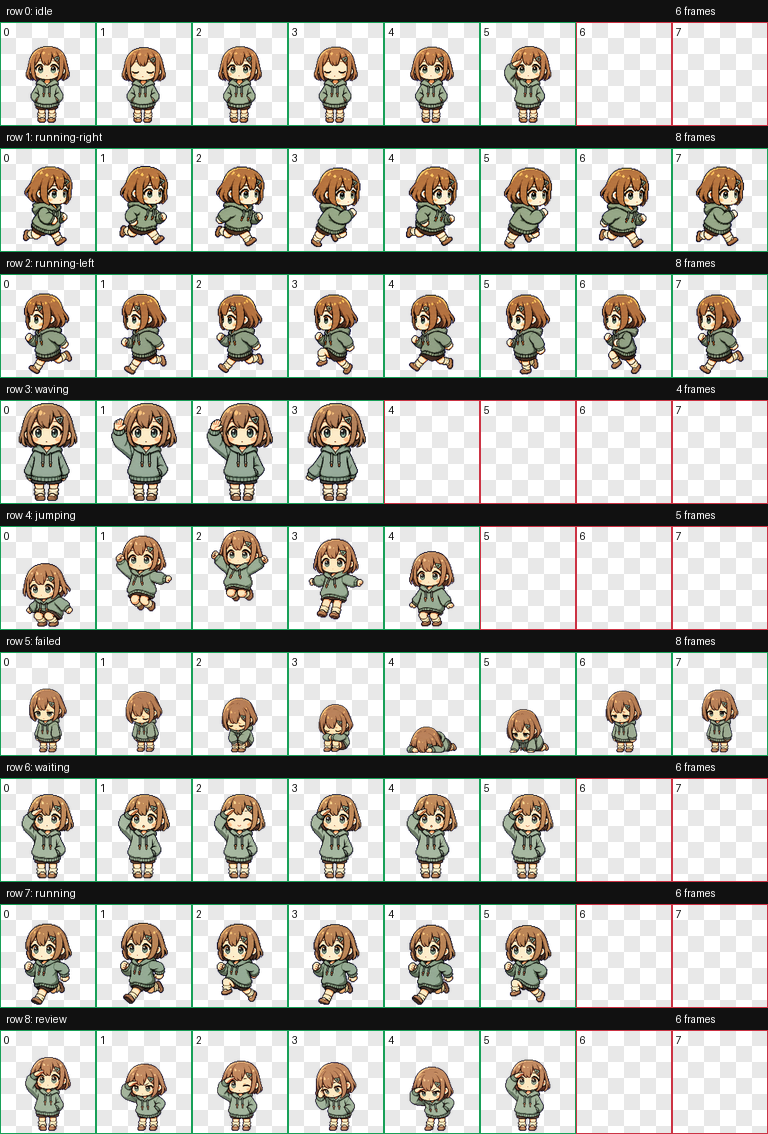
- QA結果の
qa/review.jsonは errors 0 / warnings 0 - 最終検証の
final/validation.jsonは errors 0 / warnings 0 - 完成spritesheetの
final/spritesheet.webpは 1536x1872 RGBA - プレビュー動画
qa/videos/*.mp4は9 row分を生成済み - 正式アセット
~/.codex/pets/dokochanに pet.json と spritesheet.webp を配置済み
画像生成はすべて組み込み画像生成で行い、API KEY fallbackは使っていません。 row生成はsubagentに委譲し、親エージェントだけがmanifest記録とpackage処理を行いました。
AIに同じ改善を頼むための追補SKILL.md
最後に、今回の知見をそのまま別のAI作業へ渡せる形にしておきます。
これは既存の hatch-pet skillを置き換えるものではなく、切り抜きと正規化まわりの判断を追加するための追補です。
公開されている元skillのURLがある場合は、そのURLを「元にするskill」として併記し、このMarkdownをパッチ方針として貼るのが扱いやすいと思います。
コピペ用SKILL.md
# Hatch Pet Cropping Stabilizer

## Positioning

This is a patch-style companion instruction for an existing `hatch-pet` skill.
Do not replace the original pet generation workflow with this file alone.

Base skill:

- `hatch-pet`
- If there is an official public URL for the installed skill, keep that URL here.
- In a local Codex/Claude environment this is usually equivalent to:
  - `$HOME/.claude/skills/hatch-pet/SKILL.md`
  - or `$HOME/.codex/skills/hatch-pet/SKILL.md`

## Goal

When a generated pet looks unstable during animation, fix the crop and normalization pipeline before asking the image model to regenerate the character.

The common failure is:

- the image itself is mostly fine
- but each frame is cropped and fit independently
- so crouching, jumping, falling, or running poses appear to change character size
- the head can look too large, or locomotion rows can look smaller than idle rows

The goal is to preserve character identity and apparent scale across the whole spritesheet while keeping real vertical motion, especially jumping.

## Hard Rules

1. Do not create placeholder art with SVG, canvas, Pillow drawings, CSS shapes, or hand-made diagrams as a substitute for real generated pet images.
2. Do not solve size wobble by blindly regenerating row images.
3. Treat size wobble as a crop, scale, placement, and baseline problem first.
4. Keep generated character art as the source of truth unless the row image is visually broken.
5. Use before / after GIFs for verification, especially for jumping.

## Required Pipeline

### 1. Generate real row strips

Generate one horizontal row strip per motion such as:

- idle
- running-right
- running-left
- waving
- jumping
- failed
- waiting
- running
- review

Each row strip should contain multiple poses of the same character on a removable chroma-key background.

### 2. Remove background

Remove the chroma-key background and convert the pet pixels to an alpha mask.

Do not treat checkerboard preview pixels as transparency unless they are truly transparent in the image file.

### 3. Detect connected components

From the alpha mask:

1. find connected non-transparent pixel components
2. choose the largest components as pose seeds
3. sort pose seeds by horizontal center
4. attach small nearby components to the nearest pose seed
5. crop each grouped pose from the row strip

This avoids losing small separated parts such as ears, accessories, tires, hands, or outline fragments.

### 4. Compute one global scale

Do not decide scale frame by frame.
Do not decide scale only from each row.

Compute the largest character rectangle across the whole run, then choose one base scale that fits the final cell size.

Recommended cell:

- width: 192px
- height: 208px

The same global scale should be the default for every frame.

### 5. Preserve foot baseline

Place frames by a foot baseline.

For normal standing or running motions, align the feet to the same baseline.
For jumping, keep the character size the same and express the jump as vertical position change inside the cell.

Important:

- a jump should move up and down
- a jump should not become bigger or smaller
- crouching should not make the head huge
- falling or failed poses should keep their apparent size unless the pose itself is genuinely lower

### 6. Apply row-level identity correction only when needed

Some locomotion rows may still look smaller because the generated row itself has a shorter character silhouette.
In that case, compare those rows with stable standing-like rows.

Reference rows:

- idle
- waving
- waiting
- review

Usually correctable rows:

- running-right
- running-left
- running

Avoid applying identity-height correction to:

- jumping
- failed

Jumping and failed rows often contain real vertical or pose-height changes. For those rows, keep global scale and baseline placement rather than forcing the row to match standing height.

### 7. Build the final atlas

After all frames are normalized, place them into the final spritesheet atlas.

For Codex pets, use the expected atlas layout and keep unused cells transparent.

At minimum, verify:

- final spritesheet dimensions
- transparent unused cells
- no frame overlaps
- no cropped head, feet, or accessories
- correct right-facing and left-facing rows

### 8. QA with visual evidence

Always produce:

1. contact sheet of all rows and frames
2. before / after GIF for jumping
3. before / after GIF for any row that looked too small
4. validation JSON with errors 0 / warnings 0
5. preview videos for every animation row when possible

Do not report completion based only on file generation.
Open the result visually and confirm that animation size is stable.

## Final Packaging

When the pet is ready, place the official assets where the Codex app reads them:

```text
~/.codex/pets/<pet-name>/pet.json
~/.codex/pets/<pet-name>/spritesheet.webp
```

Use the run directory only as working history and QA evidence.

```text
~/.codex/pet-runs/<pet-name>/
```

The run directory is useful for debugging, but it is not the official app asset location.

## Article / Report Notes

When documenting the result:

1. Start with the feature and the strange behavior a reader may recognize.
2. Explain that the generated image was not the main problem.
3. Show that the crop and normalization process caused apparent size changes.
4. Include real before / after images or GIFs.
5. Avoid fake SVG diagrams when real pet frames are available.
6. Record remaining weaknesses honestly.

The reader should understand why the pet looked wrong, what was changed, and how to repeat the fix.
おわりに
今回は、Codexのpetスキルで作ったキャラが、ジャンプや移動のたびに大きくなったり小さくなったり見える問題を直しました。 原因は画像生成そのものではなく、生成後のrow画像を1コマずつ切り出して、192x208のセルへ配置する処理にありました。
修正後は、フレームごとに個別fitするのをやめ、全体で共通のscaleを決めたうえで、足元baselineを基準に配置するようにしました。 さらに、左右移動のように行全体が小さく見えるケースだけ、行単位で高さを補正しています。
これで、ジャンプは「キャラの拡大縮小」ではなく「セル内の上下移動」として見えるようになり、移動中だけキャラが小さくなる違和感も減りました。 同じようなpetを作る場合は、画像を作り直す前に、切り出しと正規化の処理を確認するのがよさそうです。
Enjoy, hatching stable little pets!